Get HotMacNews- iOS App and Homepage
To access HotMacNews on your computer Click Here (It makes a great Home Page)
To download iPhone or iPad app (HotMacNews2) click here HotMacNews2
**Once in HotMacNews Home Page click on Preferences to customize to your needs.
A Short Tale , Learn English Sentence Master , The Forgotten Room and more
Universal:
 A Short Tale ( $3.99 → Free ) Glitch Games In A Short Tale you will play as Jason, an older brother who should have been careful for what he wished for. After wishing to be small again so he could feel closer to his younger brother, Jason finds himself in a surprisingly large world. Explore, solve puzzles, and make sure to use the game camera so you can take photos of all the clues you find along the way.
 Learn English Sentence Master ( $2.99 → Free ) MasterKey Games Sentence Master allows you to improve your language skills in an entertaining way. In each level you’re presented with a collection of words that must be unscrambled. Tap on the words in the correct order before time expires to move on to the next. Each mistake will cost you precious seconds, so move quickly but efficiently. The game also includes an online multiplayer mode, and achievements and leaderboards.
 The Forgotten Room ( $1.99 → Free ) Glitch Games The Forgotten Room is a moody and atmospheric adventure. You play as John Murr, a successful yet tormented paranormal investigator whose latest case involves finding a missing girl named Evelyn Bright. Evelyn went missing while playing hide and seek with her father, and you must discover the truth about what really happened in the forgotten room. The game also includes a fantastic soundtrack from Richard J. Moir.
 Forever Lost: Episode 3 HD ( $5.99 → Free ) Glitch Games Forever Lost: Episode 3 will finally reveal the truth behind the demented Hawthorne Asylum. Piece together the puzzle of your life by collecting items, following clues, and snapping photos of anything that catches your eye. The game includes beautifully rendered 3-D environments, an eerie soundtrack, and a hint guide.
 All That Remains: Part 1 ( $1.99 → Free ) Glitch Games The locals used to say your father was crazy for building a bunker, but now they can’t say anything because they’re all dead and you’re still here. When you mysteriously wake up in your father’s bunker a familiar voice can be heard over a two-way radio, and it’s your sister who tells you she has also been locked up in a bunker for her own protection. It’s up to you to figure out how you both ended up in this situation and find her before it’s too late. All That Remains: Part 1 includes an in-game camera for taking photos of clues found along the way, loads of puzzles to solve, and an original soundtrack.
 Forever Lost: Episode 2 HD ( $4.99 → Free ) Glitch Games Forever Lost: Episode 2 begins right where the original left off. You’ve escaped from whatever it was that was holding you. Now it’s time to figure out exactly what happened and where to go from here. Piece together the puzzle of your life by collecting items, following clues, and snapping photos of anything that catches your eye. The game includes beautifully rendered 3-D environments, an eerie soundtrack, and a hint guide.
 Forever Lost: Episode 1 HD ( $2.99 → Free ) Glitch Games
Piece together the puzzle of your life by following the clues scattered around the 3D environments. Collect items, scribble notes, and snap photos to work your way out of the haunted nightmare. The game also includes an eerie soundtrack, and a full hint guide so you'll never be stuck for too long.
Forever Lost: Episode 1 HD ( $2.99 → Free ) Glitch Games
Piece together the puzzle of your life by following the clues scattered around the 3D environments. Collect items, scribble notes, and snap photos to work your way out of the haunted nightmare. The game also includes an eerie soundtrack, and a full hint guide so you'll never be stuck for too long.
 cRate Pro – Currency Converter ( $0.99 → Free ) 良峰 侯 cRate is fast and convenient. You’re able to choose from over 160 world currencies and organize them as you see fit. Enter a value for the base currency and all of the other currencies you have chosen will be converted. The app also includes background rate updates, a built-in calculator, and historical charts.
 Dream A Little Dream ( $0.99 → Free ) Moneer Marouf Enter a dreamy land in this arcade-style relaxing game. Collect stars and powers as you are falling into the twilight sky. Tap the screen to dodge obstacles. The calming and relaxing background music pairs well with the pixel art style.
Source link: http://appadvice.com/apps-gone-free

This blog, HotMacNews.com, and HotMacNews app will be down at times only on weekends in February 2022 as we move to a better server.
Thank you for your understanding.
The iPhone 13 is Apple’s current smartphone, the top-of-the-line version you can buy on shelves right now. It launched late last year, equipped with Apple’s A15 Bionic processor inside. And apparently Apple’s still got plenty to brag about.
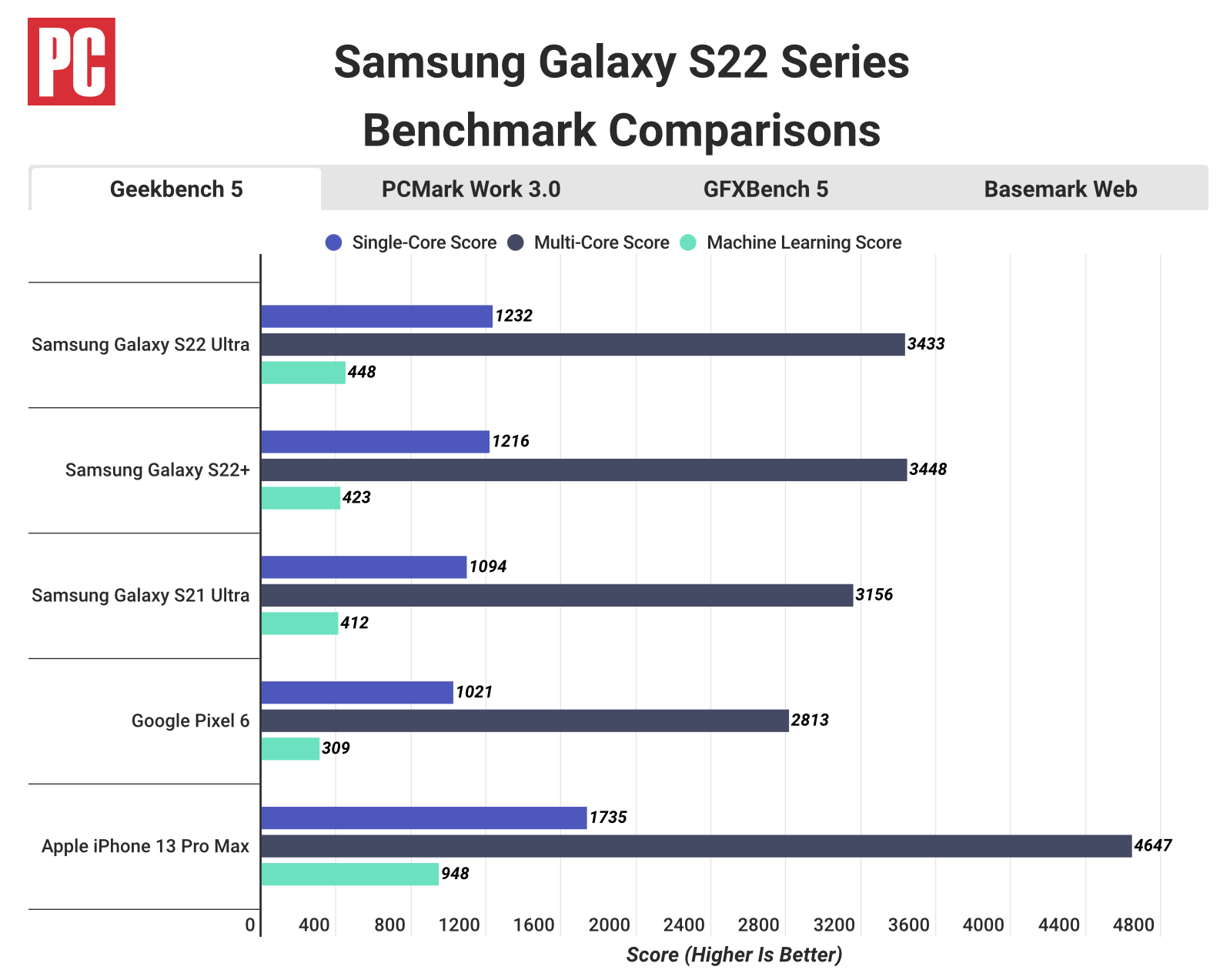
The reason, of course, is the A-series prowess and speed. As is par for the course, Samsung’s newest devices need to be compared to Apple’s current lineup (because that’s just how the release windows work), and according to PCMag‘s testing, the iPhone 13 is significantly faster than Samsung’s newest smartphones.
For those who might have missed it, Samsung just launched the Galaxy S22 lineup. It features three smartphones: the Galaxy S22, the Galaxy S22+, and the Galaxy S22 Ultra. Each of the new devices is equipped with Qualcomm’s latest and greatest processor for flagship phones, the Snapdragon 8 Gen 1. So, for fun, the publication put the benchmark test to Samsung’s premier handset, the Ultra trim.
The results show that the Galaxy S22 Ultra earned a multi-core score of 3,433. That compares to the multi-core score of 4,647 for the iPhone 13 Pro Max. Comparing the two, and looking at just CPU performance, this means Apple’s smartphone is around 35 percent faster than Samsung’s comparable model.
You can see how it all breaks down, including with Google’s Pixel 6 thrown in for good measure, in the graph above.
It’s worth noting here that in the United States, each of the Galaxy S22 models are equipped with the Qualcomm processor, as mentioned above. Meanwhile, in Europe, the devices are equipped with Samsung’s own Exynos 2200 chip. Still, even with the processor swap, the performance remains about the same.
Go check out the original report for other benchmark tests run on the handsets. They are certainly interesting to look at. But, as is standard, these tests aren’t necessarily indicative of how real world performance will be with repetitive use. And, of course, each individual is different in how they use their phone. So while the iPhone 13’s A15 processor might still outperform Qualcomm’s, Galaxy S22 owners will probably be still pretty happy with their purchase.
Source link: https://www.idownloadblog.com/2022/02/11/iphone-13-samsung-galaxy-s22-benchmarks/
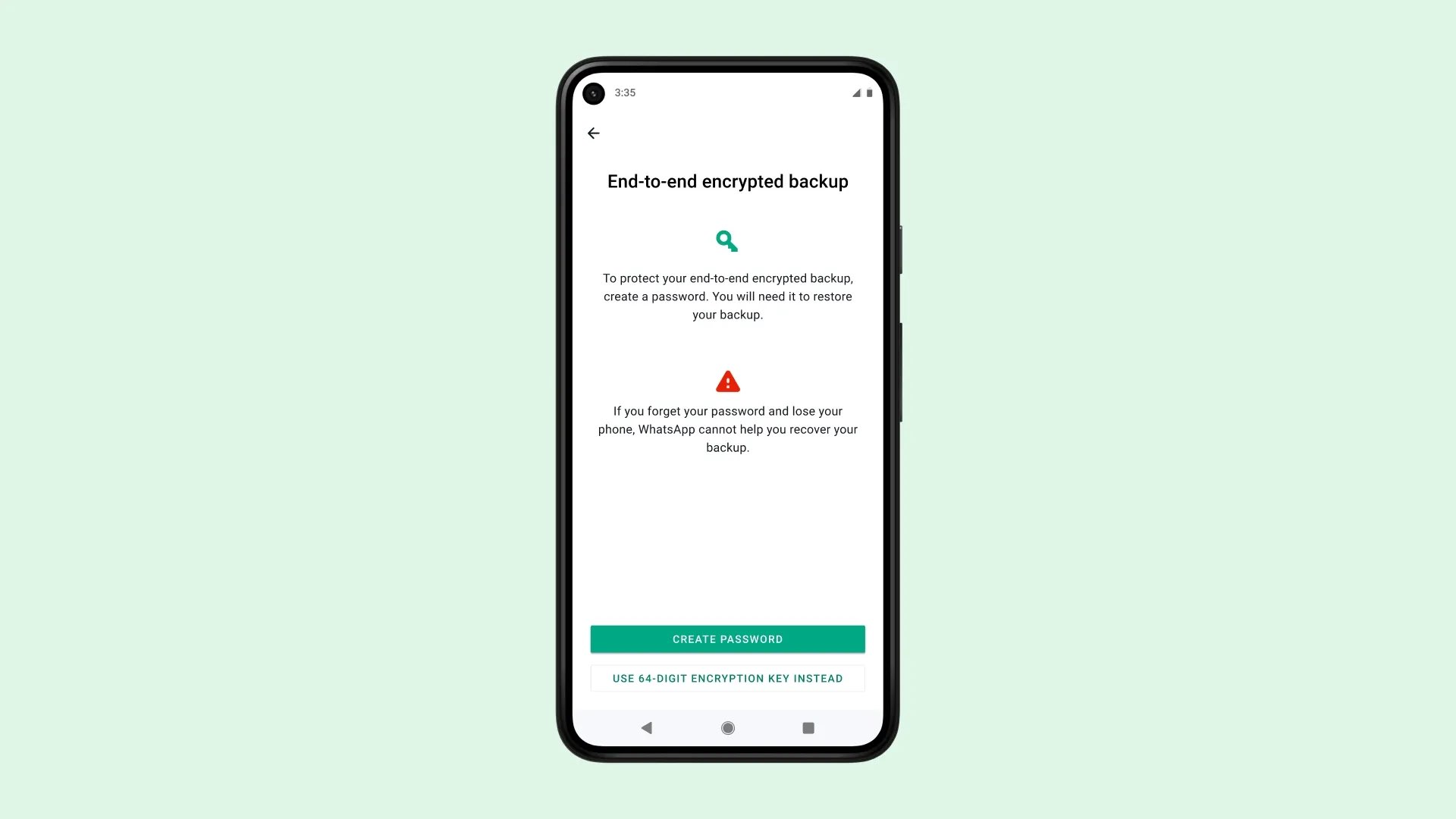
Follow these steps to enable end-to-end encrypted WhatsApp backup to boost your security by keeping your chat logs and media backups stored in the cloud private.
How does end-to-end encrypted WhatsApp backup work?
WhatsApp has supported backing up your chat archive to iCloud or Google Drive for quite some time. By default, your backups are stored unencrypted in the cloud. With a valid subpoena, a government agency could get access to an unencrypted backup file stored on Apple’s servers and comb through your WhatsApp chats.
What end-to-end encryption for backups does is add an optional layer of security to protect your chat history and media stored on Google Drive or iCloud with end-to-end encryption. Read: How to check if a specific mobile phone number is on WhatsApp
End-to-end encryption ensures only you and the person you’re communicating with can read or listen to what is sent, and nobody in between, not even WhatsApp. With end-to-end encrypted backup, you can also add that same layer of protection to your backup on iCloud or Google Drive.
You can secure your backup files in two ways:
- Encryption password: An encryption password of your choice must contain at least eight characters and one letter. This password is separate from your device passcode and your other passwords.
- Encryption key: Instead of using a password, you can create a 64-bit encryption key.
Be sure to store your password or encryption key in a safe place because WhatsApp cannot reset your password or help restore your backup.
How to fully encrypt your WhatsApp backups
To turn on end-to-end encrypted backups on WhatsApp, go to your chat backup in settings and slide the switch “End-to-end Encrypted Backup” to the ON position. This will secure and encrypt WhatsApp backup on your device, in transit and on servers.
- Open the WhatsApp app and choose “Settings” at the bottom
- Select “Chats” from the root list
- Touch the option labeled “Chat Backup”
- Now hit “End-to-end Encrypted Backup”
- Hit “Turn On” to enable end-to-end encryption for WhatsApp backups
- Choose “Create Password” to create your own encryption password or select “Use 64-digit Encryption Key Instead” to have WhatsApp generate your encryption key
- With your encryption password or key created, hit “Create” to start the encryption
As the encryption process takes place in the background, you can continue using WhatsApp and your iPhone. The operation can drain the battery so connect your iPhone to power. With the process finished, you’ll have an end-to-end encrypted backup in iCloud. You don’t need to do anything from this point onward as future backups will be automatically end-to-end encrypted.
Don’t forget to toggle off WhatsApp in iCloud Backup
If you are using Apple’s iCloud Backup feature, you should exclude WhatsApp from those backups as they aren’t protected by WhatsApp’s end-to-end encryption. To do so, go to Settings → [your name] → iCloud → Manage Storage, then choose “Backups” from the list below. Lastly, select a device backup in iCloud and then untoggle WhatsApp. That’s it, this will prevent unencrypted versions of your WhatsApp chat history and media from being backed up to iCloud as part of your device backup in the cloud!
How to turn off encrypted backups on WhatsApp
To turn off end-to-end encrypted backups on WhatsApp, access your chat backup in the app’s settings and toggle off the option labeled “End-to-end Encrypted Backup.” From that point on, your WhatsApp chat history and media will be stored unencrypted on your device, while being transferred through the network as well as stored on servers.
- Open the WhatsApp app and choose “Settings” at the bottom
- Select “Chats” from the root list
- Hit the “Chat Backup” option
- Now touch “End-to-end Encrypted Backup”
- Touch “Turn Off,” then enter your password
- Select “Turn Off” to confirm the action
Your WhatsApp backup will no longer be end-to-end encrypted. Here are all the ways to turn off end-to-end encrypted backup in WhatsApp if you choose “I forgot my password” on the password entry screen:
- Face ID
- Touch ID
- Device passcode
“If you turn off end-to-end encrypted backup, your messages and media will no longer back up to the cloud unless you set them up to do so,” WhatsApp notes.
Can’t remember your backup password?
That’s why we told you to write down your backup password! WhatsApp cannot reset your password nor can it help restore your backups. But as it turns out, you are permitted to change the password for encrypted WhatsApp backups or even turn the feature off—even if you cannot remember your encryption password or key.
- Open the WhatsApp app and choose “Settings” at the bottom
- Select “Chats” from the root list
- Choose the option labeled “Chat Backup”
- Hit “End-to-end Encrypted Backup”
- Choose the “Change Password” option
- Hit “I forgot my password” and then authorize yourself using Face ID, Touch ID or your iPhone passcode
- You can now create a new password for your encrypted backups or turn off end-to-end encrypted backup by selecting “Turn Off,” then “Done.”
Again, write that password down now!
I forgot my backup password and lost my phone!
This is the worst-case scenario. Unfortunately, there’s nothing you can do if you find yourself in this situation. You must either know your password, which will let you restore WhatsApp from a backup, or have access to the WhatsApp chats on your device. WhatsApp explicitly warns that “If you can’t remember your password and don’t have access to your WhatsApp chats, you won’t be able to access your backup.”
How many password attempts do I have?
Don’t panic and don’t try out different password combinations or you may get locked out temporarily. WhatsApp says that if you attempt to enter your encryption password or key a total of five times, you’ll need to wait before trying again.
What if I don’t restore my backup?
When you start using WhatsApp on a new device and choose to restore from a backup, you may skip this step and restore manually later in the WhatsApp settings. In other words, your backup continues to be available even if you reinstall WhatsApp on another device. Read: How to change your username in WhatsApp on iPhone
Source link: https://www.idownloadblog.com/2022/02/11/end-to-end-encrypted-whatsapp-backup-tutorial/
Screen Mirroring・Cast・Replica , My City : Love Story , Remote Control [Pro] and more
Universal:
 Screen Mirroring・Cast・Replica ( $39.99 → Free ) TIAGO FRANCISCO MARTINHO, UNIPESSOAL LDA
Replica allows you to enjoy your favorite apps and content on your TV. It supports Google Chromecast TV, Amazon Fire TV, and Android TV. Simply download the app and connect to your supported device or TV with Cast TV built-in. Then start mirroring to duplicate whatever is on your screen. Replica’s high quality, low latency stream ensures your content looks just as good on the big screen as it does on your mobile device.
Screen Mirroring・Cast・Replica ( $39.99 → Free ) TIAGO FRANCISCO MARTINHO, UNIPESSOAL LDA
Replica allows you to enjoy your favorite apps and content on your TV. It supports Google Chromecast TV, Amazon Fire TV, and Android TV. Simply download the app and connect to your supported device or TV with Cast TV built-in. Then start mirroring to duplicate whatever is on your screen. Replica’s high quality, low latency stream ensures your content looks just as good on the big screen as it does on your mobile device.
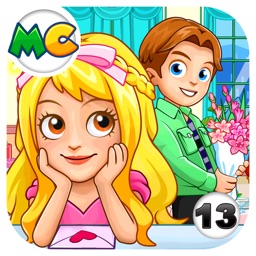 My City : Love Story ( $2.99 → Free ) My Town Games LTD The story begins when two teens move in next door and become friends. They meet up everyday and eventually fall in love. You’ll get to decide what clothes to wear for each night out. There are eight locations that all make for the perfect date. My City supports multi-touch so kids can play together on the same screen.
 Remote Control [Pro] ( $7.99 → Free ) Evgeny Cherpak
Remote Mouse & Keyboard just works. Simply visit https://cherpake.com/get and install the companion software onto your Mac or PC. Then launch Remote Mouse & Keyboard on your iPhone or iPad and it’ll automatically connect. Remote Mouse & Keyboard cannot only act as a trackpad with touch gestures but also a functional keyboard, application launcher and switcher, and remote.
Remote Control [Pro] ( $7.99 → Free ) Evgeny Cherpak
Remote Mouse & Keyboard just works. Simply visit https://cherpake.com/get and install the companion software onto your Mac or PC. Then launch Remote Mouse & Keyboard on your iPhone or iPad and it’ll automatically connect. Remote Mouse & Keyboard cannot only act as a trackpad with touch gestures but also a functional keyboard, application launcher and switcher, and remote.
 Pixelizator ( $0.99 → Free ) Grzegorz Surma Pixelizator can be used to create retro 8-bit style works of art or censor areas of photos. Simply crop out the area you want to pixelate and drag the slider at the top of the screen to adjust the size of the pixels. Photos can be saved back to the camera roll or shared directly to other apps.
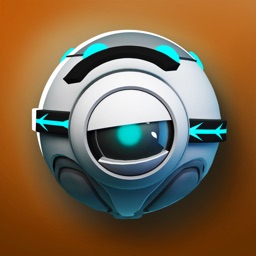 SPHAZE: Sci-fi puzzle game ( $0.99 → Free ) Mateusz Janczewski
Help RoBeep get to the center of the maze in this relaxing exploration game. It is up to you to guide mysterious robots through different areas while solving arcade puzzles. Each area is unique and hand-crafted. SPHAZE is designed for everyone to pick up, enjoy, and complete.
SPHAZE: Sci-fi puzzle game ( $0.99 → Free ) Mateusz Janczewski
Help RoBeep get to the center of the maze in this relaxing exploration game. It is up to you to guide mysterious robots through different areas while solving arcade puzzles. Each area is unique and hand-crafted. SPHAZE is designed for everyone to pick up, enjoy, and complete.
 Calcvier – Keyboard Calculator ( $2.99 → Free ) Sergei Shpygar The days of switching between apps to calculate are over. Calcvier puts a calculator right into your keyboard. It includes all basic operations as well as the ability to save expressions. A dark theme is available as well.
Source link: http://appadvice.com/apps-gone-free